Common eCoC Pitfalls: XML Validation Errors, Signature Problems and How to Steer Clear of Them
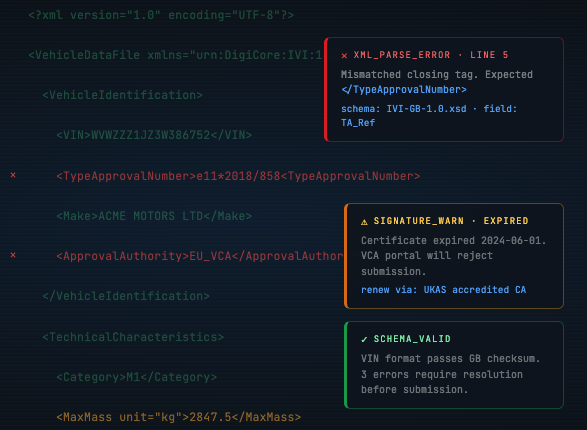
Why eCoC submissions get rejected
National access points (NAPs) right across the EU run automated validation on every eCoC submission. Any file that fails the XSD schema check or carries an invalid digital signature is turned away on the spot. Knowing the failure modes that crop up most — and building processes to head them off — is key to a smooth transition.
The pitfalls that show up most often
1. The XML formatting changes after signing
By far the most frequent reason a signature is invalidated. Once an IVI XML file is digitally signed, any change at all — inserting a whitespace character or line break, or reformatting the XML — breaks the signature. The file has to be signed as the very last action before submission.
2. The wrong approval authority codes
Every EU Member State carries its own approval authority code (such as e1 for Germany, e9 for Spain or e2 for France). Picking the wrong country code, mixing codes between Member States, or leaving the code out altogether all end in rejection at the receiving NAP.
3. Missing mandatory fields
The IVI schema runs to hundreds of fields, many of them conditionally required depending on vehicle category and build stage. A field that is optional on a base vehicle can be mandatory on a completed one. Leave out a single required field and the XSD check fails.
4. Mismatched data types
Text dropped into numeric fields, dates in the wrong format, or masses at the wrong decimal precision will each throw an XSD validation error. The data must line up exactly with the types the schema defines.
5. Expired or invalid signing certificates
A digital signature needs a valid certificate from a recognised trust service provider. Expired certificates, self-signed ones, or certificates issued by providers that are not recognised will all make the signature validation fail.
6. Inconsistencies across stages
On multi-stage builds, the completed-vehicle eCoC has to point to the right base-vehicle data. Any mismatch in VINs, type approval numbers or stage references between the base and completed eCoCs gets flagged.
How to stay clear of these pitfalls
- Always run the XSD schema validation before you sign
- Never touch a file after signing it — make signing the last step
- Use the testing window (March–July 2026) to lodge test files and catch problems early
- Automate the generate → validate → sign → submit pipeline to take manual error out of the loop
- Keep an eye on certificate expiry dates and renew with plenty of time to spare
eCoC EU² designs out the common errors
The eCoC EU² software automates the whole eCoC pipeline, stripping out the manual steps where most errors creep in:
Ready for the EU eCoC rollout?
Book a free demo and see how eCoC EU² can have your eCoC process production-ready across every EU Member State.